Oxygenserv Exclusive
Manage your
|
from Discord.
Install, configure and manage your Oxygenserv server directly from your Discord channel. No need to open the panel. Included free with all our servers.
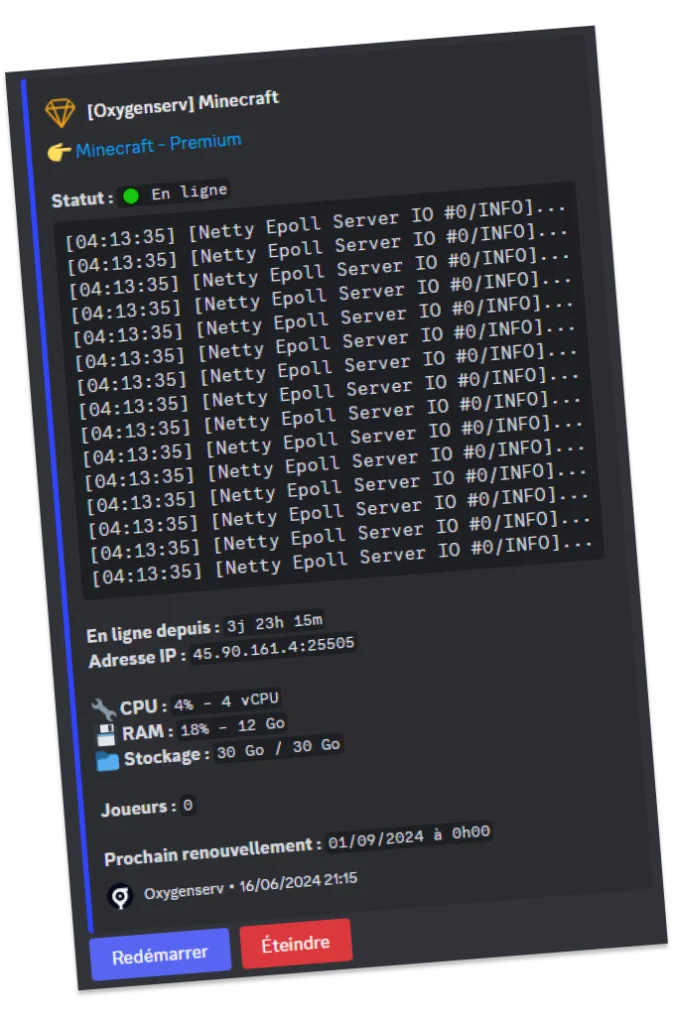
/server status
Minecraft — Premium
Features
Your entire server in Discord.
Remote control
Start, stop and restart your server in one click from Discord. No need to open the panel for quick actions.
Real-time monitoring
Check status, logs, CPU and RAM usage of your server at any time. Get alerts if something goes wrong.
Player management
Keep an eye on all connected players. Ban, kick and whitelist directly from your Discord channel.
Connection info
Quickly access IP, port, FTP and database credentials of your server without leaving Discord.
Automatic crash detection — Oxybot will automatically detect crashes and send you a Discord alert with logs. Never have a server down without knowing again.
Coming soonRemote control
Start, stop and restart your server in one click from Discord. No need to open the panel for quick actions.
Player management
Keep an eye on all connected players. Ban, kick and whitelist directly from your Discord channel.
Real-time monitoring
Check status, logs, CPU and RAM usage of your server at any time. Get alerts if something goes wrong.
Connection info
Quickly access IP, port, FTP and database credentials of your server without leaving Discord.
Automatic crash detection — Oxybot will automatically detect crashes and send you a Discord alert with logs. Never have a server down without knowing again.
Coming soonHow it works
Ready in 3 minutes.
Invite the bot
Add Oxybot to your Discord server in one click. No complex configuration required.
Link your server
Connect your Oxygenserv game server to your Discord channel with the /link command.
Use commands
Manage your server with simple commands like /server status, /server start, etc.
FAQ
Frequently asked questions
Yes, Oxybot is included free with all Oxygenserv servers. No extra fees, no subscription.
Yes, Oxybot is compatible with all servers hosted at Oxygenserv: Minecraft, Rust, ARK, Palworld, Garry's Mod and all others.
Yes, you can configure permissions so your admins and moderators can also manage the server from Discord. Each role can have different access levels.
After inviting Oxybot to your Discord, use the /link command with your Oxygenserv server ID. Linking takes just a few seconds.


Ready to create your server?
Join thousands of players who already manage their server from Discord. Free and no commitment for all Oxygenserv customers.
Create my serverFree for all Oxygenserv customers.